POST / 004
The process of making my new website using GPT 5.6 sol.
The process of making my new website using the new GPT 5.6 sol model.
- Published
- Read
- 7 minutes
- Author
- Max (MJDawson)
- Category
- AI
- Revised
Why did I need a new website?
My website looked like AI slop and needed massive improvements. With the release of GPT-5.6 Sol with ultra thinking, I decided that improving my website would be the perfect task for it.
As someone who has used 5.3 billion Codex tokens in the past few months, I think I've used enough AI to have a fair say on the quality of GPT-5.6 Sol when making my website.
How do you make a GOOD-looking website using AI?
Making a good website is not as easy as simply asking AI to make one. It takes meticulous planning, testing and gradual tweaking.
My steps
Step 1: Making a new skill
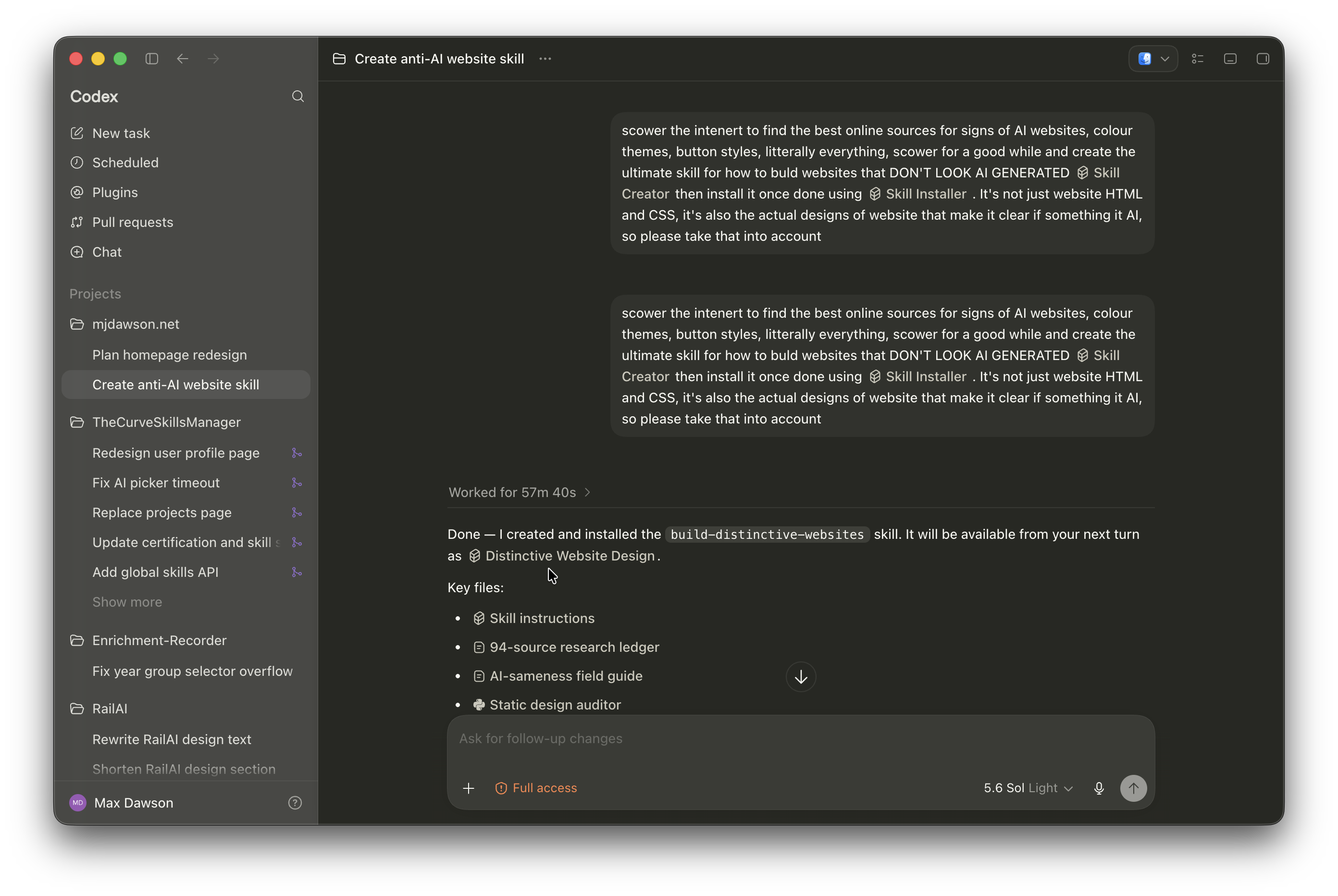
I started by asking AI to make a new skill for building my website. I asked GPT-5.6 Sol to search online for common signs of AI-generated websites and use that research to make an anti-AI-slop website skill.
It worked for 57m 40s, creating a short skill called build-distinctive-websites. The size of the skill was disappointing; however, after reading it, I found that it was high quality and followed a very specific style. It also created an example website, which looked fairly good.
The prompt I used was:
Search the internet to find the best online sources for signs of AI websites, colour themes, button styles, literally everything. Search for a good while and create the ultimate skill for how to build a website that DOES NOT LOOK AI GENERATED [$skill-creator], then install it once done using [$skill-installer]. It's not just website HTML and CSS; it's also the actual design choices that make it clear if something is AI, so please take that into account when creating this skill.
Step 2: Redesign plan
Since I already had a working website with content, I didn't need to create a new website from scratch. It was just a case of modifying the existing one.
When doing any large task with AI all at once, it's important to use plan mode. It might seem like you are sacrificing speed and token consumption for quality, but that is completely wrong. In reality, the AI will often build faster because it knows what it is doing beforehand. It can also use fewer tokens because it already knows which files contain each part of the website, rather than repeatedly checking them.
There are basically no downsides to asking AI to plan first.
The prompt I used for the design was basic, but it got the point across. With older AI models, I would have first uploaded the prompt to ChatGPT and asked it to optimise it further. However, GPT-5.* models have generally been good enough that this is no longer as necessary, and I was fairly confident that I could put my faith in GPT-5.6 Sol as the most capable model.
Please completely redesign the home page of my website. Generate an image of what the style should look like. You don't necessarily need to change the text or content much, just redesign it.

It should be light mode, with new colours, a new layout and new everything. Literally yoink and delete all the HTML and CSS currently there and redesign the whole thing, with sick animations, transitions, etc.

Most importantly, use the [$build-distinctive-websites] skill, and only make a design plan. Don't make the website changes yet.
As you can see, the prompt was not very well optimised, but this is the stage we are now at with AI. All the points I wanted came across, and since we were only planning, it was less important to make the prompt perfect.
After working for 23m 18s, the AI produced a plan. Previous models such as GPT-5.5 or GPT-5.4 would have worked for less than five minutes on average for this kind of task, so the sheer increase in working time is crazy.
The plan itself was fairly short and included an AI-generated screenshot showing what the website might look like. It looked good enough. Not AI slop, that's for sure.
Step 3: Implementation
At this point, I was happy with the screenshot, so I simply said:
Yes, implement this plan.
If there had been something I didn't like, I would have mentioned it in that message and asked the AI to implement the plan with that part changed. If many things were wrong, or I wanted to take the design in a completely different direction, I would have asked it to improve the plan first.
51m 1s later, we had a working website.
It did NOT look like the plan.
So now it was time for some tweaking.
Step 4: Tweaking
Tweaking is very important. There were many small things that needed changing. I uploaded screenshots of the things I didn't like, told it directly what was wrong, and even went in and modified the code myself.
The first round of tweaks took 1h 20m 14s, which was longer than the initial implementation.
The next change was fixing and improving the contact system. This wasn't mentioned in the original prompt, so it was less of a tweak and more of a completely new feature. This took an additional 52m 3s to implement.
The next three tweaks took a combined 27m 8s, and I was finally happy with the website.
I also made many changes by hand. Editing code yourself is often much better than asking AI, particularly for very small changes, although I only spent short amounts of time doing this.
Step 5: Testing
Testing happened in parallel with the previous tweaking step.
This mostly involved me, and sometimes the AI, going through the website and testing every feature. This included fixing small inconsistencies, checking that forms submitted correctly, confirming that links worked and testing edge cases.
Modern AI generally doesn't make too many obvious mistakes, but it is still important to check everything.
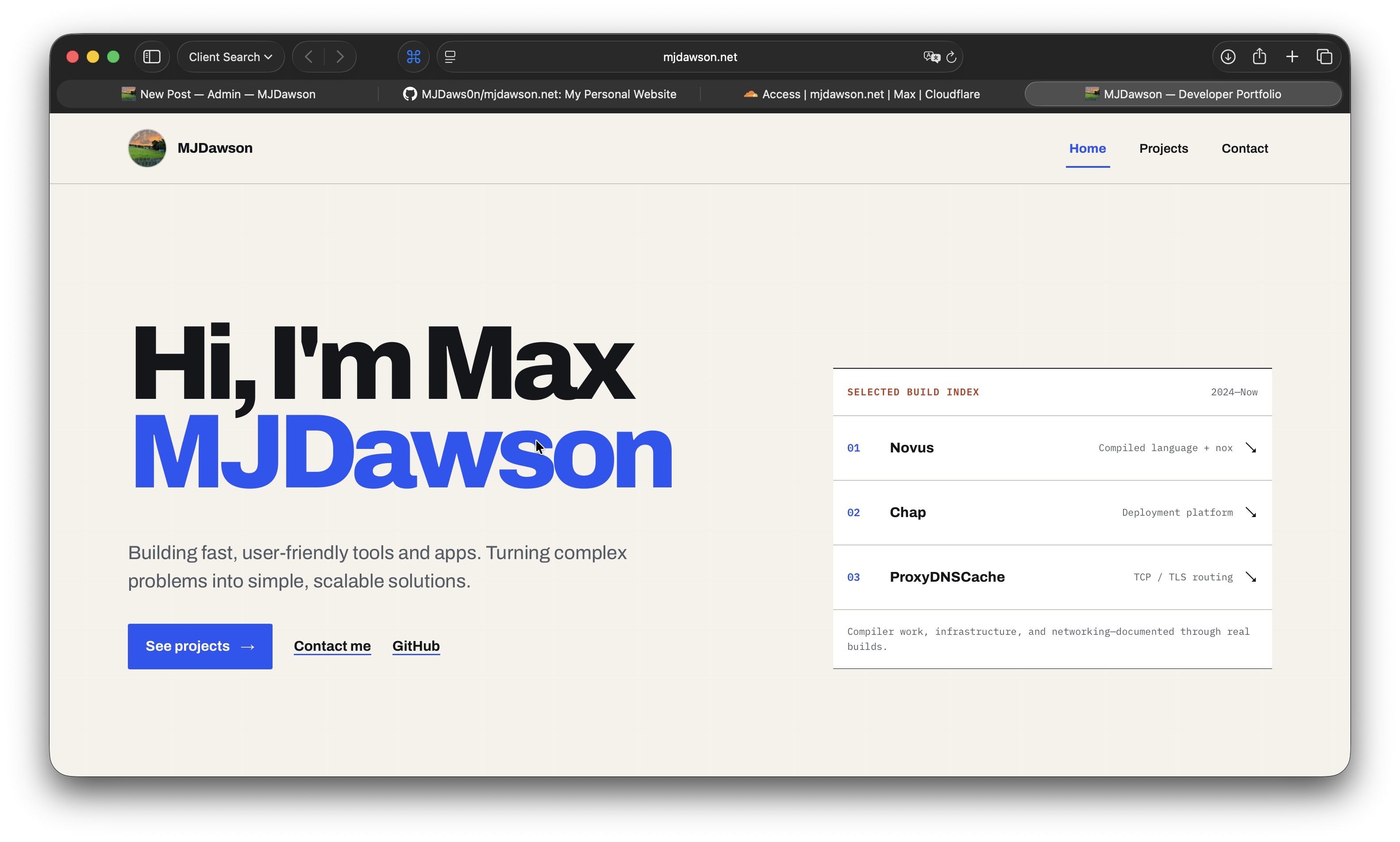
The final website
The total time the AI ran for was almost six hours.
That might sound like a long time, but remember that you don't have to sit there waiting for it to finish. In total, it probably required less than one hour of actual work from me, including testing, deployment and writing the prompts.
Writing this post has so far taken me longer than the amount of time I personally spent making the website, yet the final website is still almost exactly how I would have made it myself.
The process used a total of 350 million tokens. If those tokens had been paid for through the OpenAI API, I estimate that it could have cost around $2,144, using the following prices:
- Uncached input: $5 per million tokens
- Cached input: $0.50 per million tokens
- Cache writes: $6.25 per million tokens
- Output and reasoning: $30 per million tokens
I used the following estimated token distribution:
- 85% input and 15% output/reasoning
- 70% of input successfully read from the cache
- 25% normal uncached input
- 5% cache writes
That's only an estimate, but it is still mad.
GPT-5.6 Sol massively overthinks.
Obviously, I didn't spend $2,144 updating my website. It used a small portion of my weekly Codex credits on the 5× Pro plan, which costs $100 per month.
Conclusion
GPT-5.6 Sol is very good when used properly. It can make genuinely decent-looking websites, but it is slow and uses far too many tokens.
AI handled most of the planning and implementation, but the final quality still came from repeatedly reviewing its work, explaining what was wrong, testing everything and making manual changes where that was easier.
EVIDENCE REGISTER